《await 的使用》
ES6 await 语法详解
在ES6中,await 是异步编程的核心语法,必须配合async函数使用。用于等待Promise对象的状态(resolved成功、rejected失败)敲定,并且暂停当前函数的执行,一直到异步操作完成后再恢复执行。
必备的核心前提
await 不能够单独使用,必须满足以下两个条件之一,否则会报出语法错误(SyntaxError: await is only valid in async functions and the top level bodies of modules)
一、嵌套在async函数内部
1.1 基本语法
// 1. async 函数内部使用(推荐)
async function 函数名() {
// 等待 Promise 完成
const 结果 = await 一个Promise对象;
// 等待非 Promise 值(会自动包装为 resolved 状态的 Promise)
const 普通值 = await 123; // 等价于 await Promise.resolve(123)
}1.2 核心功能
await 的作用是暂停当前async 函数的执行,直到等待的Promise 状态改变:
-
若promise变为resolve成功:await 返回出处理成功的结果
-
若promise变为rejected失败:await会直接抛出异常,需要通过 try/catch 进行捕获;若未捕获,会导致async 函数返回的Promise 变为 rejected状态
1.3 使用场景
(1)处理单个异步操作简单使用场景
// 模拟异步请求函数(返回 Promise)
function fetchData() {
return new Promise((resolve) => {
setTimeout(() => {
resolve({ name: "ES6", feature: "await" }); // 成功结果
}, 1000);
});
}
// async 函数中使用 await
async function getData() {
console.log("开始请求数据...");
// 暂停执行,等待 fetchData 的 Promise resolved
const data = await fetchData();
console.log("数据请求成功:", data); // 1秒后执行
return data; // async 函数返回的结果会自动包装为 Promise
}
// 调用 async 函数(返回 Promise,需用 .then() 或再次 await 获取结果)
getData().then((res) => console.log("最终结果:", res));打印结果:开始请求数据…(等待1秒)数据请求成功:{ name: “ES6”, feature: “await” } 最终结果:{ name: “ES6”, feature: “await” }
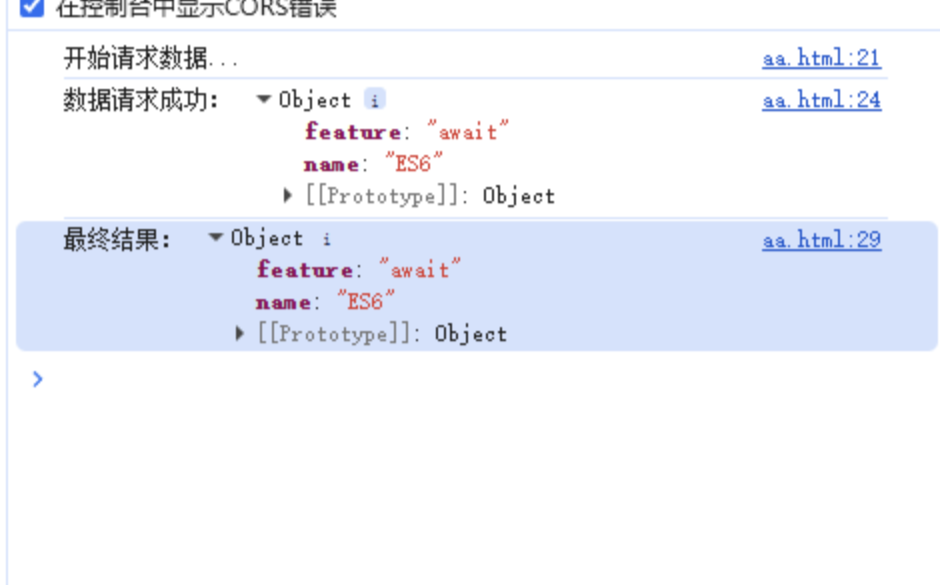
await 的使用场景(推荐)
(2)处理异步错误操作(try/catch捕获)
// 模拟失败的异步请求
function fetchFailedData() {
return new Promise((resolve, reject) => {
setTimeout(() => {
reject(new Error("网络错误,请求失败")); // 失败原因
}, 1000);
});
}
async function getFailedData() {
try {
console.log("开始请求失败数据...");
const data = await fetchFailedData(); // 等待的 Promise 会 rejected
console.log("数据请求成功:", data); // 不会执行
} catch (error) {
// 捕获 await 抛出的异常
console.log("请求失败:", error.message); // 输出:请求失败:网络错误,请求失败
}
}
getFailedData();打印结果:

(3)并行执行多个异步操作
多个异步操作没有依赖关系时,不要顺序执行await(浪费时间),推荐使用promise.all方法。
错误做法:
// 3个独立的异步请求
function request1() { return new Promise(resolve => setTimeout(() => resolve('结果1'), 1000)); }
function request2() { return new Promise(resolve => setTimeout(() => resolve('结果2'), 1000)); }
function request3() { return new Promise(resolve => setTimeout(() => resolve('结果3'), 1000)); }
// 错误做法:顺序 await(总耗时 3 秒)
async function badParallel() {
const res1 = await request1();
const res2 = await request2(); // 等 request1 完成才执行
const res3 = await request3(); // 等 request2 完成才执行
console.log('顺序执行结果:', [res1, res2, res3]); // 3秒后输出
}
badParallel()正确做法:
// 3个独立的异步请求
function request1() { return new Promise(resolve => setTimeout(() => resolve('结果1'), 1000)); }
function request2() { return new Promise(resolve => setTimeout(() => resolve('结果2'), 1000)); }
function request3() { return new Promise(resolve => setTimeout(() => resolve('结果3'), 1000)); }
// 正确做法:Promise.all 并行(总耗时 1 秒)
async function goodParallel() {
// 先启动所有异步操作(并行执行)
const promise1 = request1();
const promise2 = request2();
const promise3 = request3();
// 等待所有 Promise 都 resolved(只要有一个 rejected,整体就会 rejected)
const [res1, res2, res3] = await Promise.all([promise1, promise2, promise3]);
console.log('并行执行结果:', [res1, res2, res3]); // 1秒后输出
}
goodParallel();二、处于ES模块顶层(加载配置或者初始化资源)
2.1 基本语法
// 2. 顶层 await(模块环境)
// 需在 package.json 中设置 "type": "module"(Node.js)或 <script type="module">(浏览器)
const 数据 = await fetch('https://api.example.com/data').then(res => res.json());这句代码直接返回处理后的 Promise 状态。
fetch('https://api.example.com/data') 是 js 原生网络请求的 API,用于从指定接口获取数据或者发送数据。
2.2 使用场景
在 ES 模块顶层直接使用 await 加载配置或初始化资源:
// 模块文件:config.js(需设置 "type": "module")
// 顶层 await 加载远程配置
const config = await fetch('https://api.example.com/config')
.then(res => res.json())
.catch(err => {
console.error('配置加载失败,使用默认配置');
return { baseUrl: 'http://localhost:3000' }; // 失败时的默认值
});
export default config;
// 其他模块引入
import config from './config.js';
console.log('配置:', config); // 等待 config 加载完成后才执行《await 的使用》
作者:felinus
本文链接: https://felinus-blog.vercel.app/posts/f8882813/
本文采用 知识共享署名-非商业性使用-相同方式共享 4.0 国际许可协议 进行许可。